Industry

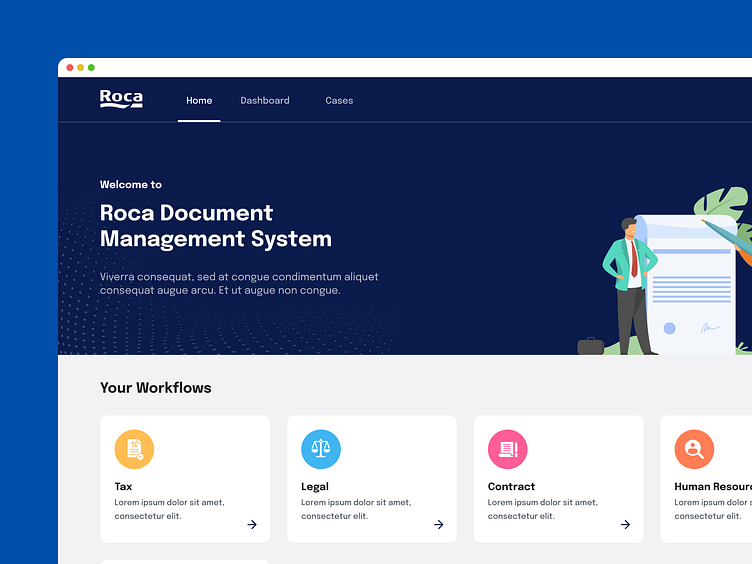
Tax & legal notice management system

Platforms

Desktop Web Application

Services Provided

UI/UX Design Dashboard Design

Overview

Roca is a global leader in bathroom products and solutions, with a history spanning more than a century. Headquartered in Spain, the company operates in over 170 countries with a workforce of more than 20,000 employees. In India, Roca has established itself as one of the dominant brands in the bathroom space, operating multiple factories and regional offices to serve a diverse and expanding market.The company’s scale and reputation require reliable and scalable internal systems to manage compliance, finance, contracts, and workforce operations. The lack of visibility in handling tax and legal notices had become a significant compliance risk for Roca in India.

Roca image 1
Roca image 2
Roca image 3

The Challenge

Roca’s legal and finance team in India was responsible for responding to a continuous stream of tax and compliance notices across multiple business units and factory sites. With hearings, submissions, and approvals to manage, the absence of a centralized system led to significant compliance risk exposure.

Inconsistent Tracking

Notices were logged in Excel sheets maintained by individuals. Records were scattered, and lacked standardization.

Missed Hearings

Because there were no reminders or alert mechanisms, deadlines slipped, and important hearings were missed.

Unclear Case Progress

With fragmented records, it was difficult for teams to gain a real-time view each legal case’s status.

Financial Penalties

Delays in responses resulted in penalties, adding unnecessary cost and compliance and legal risks to the organization.

Lack of a Reliable System

Leadership recognized the absence of a dependable system of record and the inability to extend the process across related functions such as contracts or HR compliance

Roca blog
Roca blog
Roca blog
Roca blog

Why visual identity and usability mattered

For Roca, the goal was to ensure that an internal compliance system did not feel like a generic enterprise tool. Teams needed a platform that looked consistent with Roca’s standards and felt intuitive to use every day.

Aufait UX aligned the entire interface with Roca’s existing brand guidelines from colors and typography to iconography and layout. By replacing default SharePoint components with a custom design system, the platform delivered clarity, reduced friction, and encouraged daily adoption.

Design Objectives

Roca’s objectives were clear from the outset

Consolidate legal and tax notices from multiple business units

Assign ownership and track each notice from registration to resolution 

Integrate final-stage approvals with CFO-level sign-off 

Provide a daily-use dashboard that made progress, deadlines, and priorities instantly visible 

Remove all default SharePoint UI elements and replace them with a clean, branded interface 

Extend laterally to manage other regulatory workflows such as vendor contracts and factory compliance 

Roca blog

A Dashboard UI/UX Design Experience Built for Instant Visibility

Aufait UX designed a custom dashboard UI/UX that serves as the home screen for every user on the platform.

The dashboard UI/UX design displays: 

A summary of open cases categorized by urgency 

Upcoming hearings with date indicators and countdowns 

Overdue cases highlighted with visual urgency cues 

Recent activity logs to help teams track changes across regions 

Advanced filters to view caseloads by business unit, assigned handler, or issuing authority 

Workflows on the Dashboard 

Compliance cases follow a defined life cycle : registration, hearings, escalation, closure. The dashboard was designed to make each step visible, traceable, and easy to act on. 

Notice Registration 

Every new notice is captured with standardized fields and appears instantly on the dashboard as a case tile. This ensured entries were complete, consistent, and never overlooked. 

Hearing Management 

Because there were no reminders or alert mechanisms, deadlines slipped, and important hearings were missed.

Unclear Case Progress

Hearings are surfaced on the dashboard with date indicators and automated reminders. Upcoming deadlines are clearly visible, reducing the risk of missed hearings.

Escalation Handling

If a case advances to a demand stage, the dashboard flags it with visual urgency. Escalated notices are immediately separated from routine ones, drawing leadership attention.

Case Closure and Approval 

Closure requires CFO approval, reflected in real time on the dashboard. DocuSign integration allows leaders to sign off securely from anywhere, keeping oversight seamless.

Roca blog
Roca blog
Roca blog
Roca blog
Brand image

All default SharePoint UI components were replaced with a custom design system 

The color palette, iconography, typography, and layout grids followed Roca’s internal brand standards 

The interface was designed with progressive visual hierarchy, helping users focus on actions, not just data  

UI components such as cards, buttons, form fields, and modals were built from scratch 

The layout was optimized for both desktop and tablet use, ensuring consistency across regional offices 

circle svg
circle svg

Business Impact

The real success of the platform lay in how design shaped adoption and daily use

  • check icon

    Instant Visibility

    The dashboard UI/UX design made it easy for users to see their caseload at a glance, improving responsiveness

  • check icon

    Ease Of Use

    A clear, branded interface replaced scattered spreadsheets, encouraging consistent engagement. 

  • check icon

    Leadership Oversight

    Visual cues for urgency and case status gave leaders a real-time view they could act on without navigating data from multiple levels. 

  • check icon

    Adoption Through Familiarity

    The dashboard surfaced deadlines, hearings, and escalations at a glance, reducing the cognitive load on teams. 

  • check icon

    Trust in the System

    Usability improvements ensured teams used the platform as their primary workspace, rather than defaulting back to manual trackers.

More like this